Launch a Managed RAG Service
What a RAG service is
You have documents. You want to ask questions about them and get answers you can trust, with a pointer to the exact passage each answer came from.
Doing that yourself means running four things: something to store the documents, something to turn them into vectors, something to search those vectors, and a language model to write the answer from what the search returned. That is what "RAG" (retrieval-augmented generation) means, and it is normally a codebase.
A RAG service on FoundryDB is that pipeline as a managed object. It is not another server you run. It is a record that points at the pieces you already have on the platform:
| It points at | What it is for |
|---|---|
A PostgreSQL service with pgvector | Holds the document chunks and their vectors |
| A Files bucket | Holds the source documents |
| An embedding pipeline | Reads the bucket, chunks the documents, writes the vectors |
| A reranker inference service (optional) | Reorders retrieved passages by real relevance |
Once those are wired up, you get one endpoint:
POST /rag-services/{id}/query {"question": "..."}
and it returns an answer plus the citations behind it. Retrieval policy (how many passages to pull, how to blend vector similarity with keyword matching, how many to keep after reranking) lives on the service record, so you change behaviour by patching a field, not by redeploying code.
If you want to see the moving parts rather than have them managed, Build an In-Platform RAG Assistant does the same job by hand with a Python script: it embeds a corpus, writes vectors into pgvector, and calls a chat model itself. Read that one to understand the mechanism. Read this one to ship it.
Everything here stays on FoundryDB. Storage, embeddings, retrieval, reranking, generation, and evaluation all run on your own EU-resident resources, and no external AI provider is in the path.
What you will build
By the end you will have:
- A folder of
.txtdocuments in a Files bucket, embedded intopgvectorby a managed pipeline. - A RAG service that answers questions about them with numbered citations.
- Reranking turned on, so the passage that actually answers the question ranks first instead of merely being nearby in vector space.
- A golden set and evaluation runs, so retrieval quality is a number you can track instead of an impression.
Prerequisites
- An organization you own or administer. Creating and patching a RAG service requires the owner or admin role. Asking questions requires only membership.
- Platform credentials for the management API.
curlandjq.
Set these once. Every step uses them.
export API="https://api.foundrydb.com"
export ORG_ID="<your-organization-uuid>"
export FOUNDRYDB_USER="<your-user>"
export FOUNDRYDB_PASSWORD="<your-password>"
export AUTH="-u $FOUNDRYDB_USER:$FOUNDRYDB_PASSWORD"
Step 1: Get the pieces
There are two ways to get a database, a bucket, and a RAG service. Pick one.
Option A: Launch the rag-assistant stack
The marketplace template provisions the whole set in one call. Preview the cost first, because the launch call makes you accept it explicitly.
curl -s $AUTH -X POST $API/stacks/preview \
  -H "Content-Type: application/json" \
  -d "{\"template_name\":\"rag-assistant\",\"organization_id\":\"$ORG_ID\"}" \
  | jq '{monthly_total, fixed_monthly_total,
         line_items: [.line_items[] | {symbolic_name, kind, description, monthly_cost, is_ceiling}]}'
The template has five components: a tier-2 PostgreSQL 17 with pgvector (db), a Files bucket (docs), the RAG service itself (rag), an inference route (inference), and an Open WebUI chat app (chat) attached to the first two.
The preview returns two totals, and the difference matters. fixed_monthly_total is the recurring compute and storage. monthly_total adds usage ceilings, which for this template includes the inference budget cap. Launch accepts fixed_monthly_total, so pass that one:
curl -s $AUTH -X POST $API/stacks/ \
  -H "Content-Type: application/json" \
  -d "{\"name\":\"my-rag\",\"template_name\":\"rag-assistant\",\"organization_id\":\"$ORG_ID\",\"accepted_monthly_cost\":<fixed_monthly_total-from-preview>}"
If the accepted figure differs from the current fixed_monthly_total by more than a cent, launch returns 409 and asks you to re-preview. That is the point of the gate: nothing provisions against a stale price.
Poll until the stack and all five resources read Running. Stack statuses are capitalized and run Pending, Provisioning, Wiring, Running, with Failed as the terminal failure (rollback has already completed by then, so nothing is left orphaned).
export STACK_ID="<id-from-response>"
curl -s $AUTH $API/stacks/$STACK_ID \
  | jq '{status, resources: [.resources[] | {symbolic_name, kind, status, service_id, ref_id}]}'
Read the ids you need off the resources: db and docs expose service_id, and rag exposes ref_id (org-scoped resources use ref_id rather than service_id).
The rag resource starts pipeline-less on purpose. The stack cannot know which documents you want indexed, so it creates the composition and leaves embedding_pipeline_id unset, and the query surface answers 409 until you attach one. Steps 2 to 4 are exactly what fill it in.
export PG_ID="<db service_id>"
export FILES_ID="<docs service_id>"
export RAG_ID="<rag ref_id>"
Then skip to Step 2.
Option B: Compose it by hand
Three calls. First a PostgreSQL service with pgvector:
curl -s $AUTH -X POST $API/managed-services \
  -H "Content-Type: application/json" \
  -d '{"name":"rag-pg","database_type":"postgresql","version":"17","plan_name":"tier-2",
       "zone":"se-sto1","storage_size_gb":50,"storage_tier":"maxiops",
       "extensions":["pgvector"]}' | jq '{id, name, status}'
Then a Files service in the same organization:
curl -s $AUTH -X POST $API/file-services \
  -H "Content-Type: application/json" \
  -d "{\"name\":\"rag-docs\",\"zone\":\"se-sto1\",\"organization_id\":\"$ORG_ID\"}" \
  | jq '{id, name, status}'
Poll both until Running, then capture their ids:
export PG_ID="<postgres-service-id>"
export FILES_ID="<files-service-id>"
Now create the RAG service. Only three fields are required: the organization, a name, and the Postgres service that will hold the vectors.
curl -s $AUTH -X POST $API/rag-services \
  -H "Content-Type: application/json" \
  -d "{
    \"organization_id\": \"$ORG_ID\",
    \"name\": \"support-kb\",
    \"pg_service_id\": \"$PG_ID\",
    \"files_service_id\": \"$FILES_ID\",
    \"files_prefix\": \"rag-docs/\",
    \"top_k\": 8,
    \"rerank_top_n\": 4
  }" | jq
{
  "id": "3f2b9c14-8a71-4d02-b6e5-1c9d7a4e0b33",
  "organization_id": "…",
  "name": "support-kb",
  "pg_service_id": "…",
  "files_service_id": "…",
  "files_prefix": "rag-docs/",
  "chunk_strategy": "sliding_window",
  "hybrid_dense_weight": 0.7,
  "top_k": 8,
  "rerank_top_n": 4,
  "status": "active",
  "created_at": "2026-08-09T18:04:11Z",
  "updated_at": "2026-08-09T18:04:11Z"
}
export RAG_ID="3f2b9c14-8a71-4d02-b6e5-1c9d7a4e0b33"
The retrieval knobs and their meanings:
| Field | Default | What it does |
|---|---|---|
top_k | 8 | How many chunks retrieval pulls. 1 to 50. |
rerank_top_n | 4 | How many survive into the answer and the citation list. 1 to 20, and never more than top_k. |
hybrid_dense_weight | 0.7 | Blend between vector similarity and full-text rank. 1.0 is pure vector, 0.0 is pure keyword. |
chunk_strategy | sliding_window | Also recursive or semantic. |
Note that rerank_top_n truncates the citation list whether or not a reranker is attached, so the defaults return at most 4 citations out of 8 retrieved chunks.
Step 2: Put documents in the bucket
Any .txt files will do. This tutorial uses a seven-document corpus with one fact that exists nowhere else on the internet, the edge fleet codename, so that a correct answer proves retrieval actually happened rather than the model recalling something from pretraining.
mkdir -p corpus && cd corpus
cat > doc1.txt <<'EOF'
FoundryDB Managed Inference serves open-weight LLMs on dedicated GPUs in Helsinki (fi-hel2) using the vLLM runtime, behind an OpenAI-compatible endpoint.
EOF
cat > doc2.txt <<'EOF'
Every FoundryDB organization has a monthly cost circuit breaker: when inference spend crosses the configured limit, the platform stops forwarding requests until the next cycle.
EOF
cat > doc3.txt <<'EOF'
The internal codename for the FoundryDB edge delivery fleet is Project Aurora, a set of PoPs that terminate TLS and enforce EU residency close to the client.
EOF
cat > doc4.txt <<'EOF'
FoundryDB Files are S3-compatible, EU-resident object storage buckets. They store fine-tuned LoRA adapter artifacts and Retrieval-Augmented-Generation source documents.
EOF
cat > doc5.txt <<'EOF'
A FoundryDB inference key is prefixed fdb-inf and is scoped to one organization. It carries a requests-per-minute limit and a monthly token ceiling.
EOF
cat > doc6.txt <<'EOF'
FoundryDB supports fine-tuned serving: a LoRA adapter is hot-loaded into the running vLLM process with no restart, and can be rolled back by promoting a prior version.
EOF
cat > doc7.txt <<'EOF'
The FoundryDB curated inference catalog includes mistral-7b for chat and bge-m3 for embeddings; bge-m3 produces 1024-dimensional vectors.
EOF
Upload each one under the rag-docs/ prefix. The platform presigns a PUT, and the bytes go straight to object storage without passing through the management API.
for f in doc*.txt; do
  URL=$(curl -s $AUTH -X POST $API/file-services/$FILES_ID/presign \
    -H "Content-Type: application/json" \
    -d "{\"method\":\"PUT\",\"key\":\"rag-docs/$f\",\"content_type\":\"text/plain\",\"expires_seconds\":600}" \
    | jq -r .url)
  curl -s -o /dev/null -w "$f %{http_code}\n" -X PUT "$URL" \
    -H "Content-Type: text/plain" --data-binary "@$f"
done
doc1.txt 200
doc2.txt 200
…
doc7.txt 200
The content_type is signed into the URL, so the PUT must send the same Content-Type header or object storage rejects the signature.
Step 3: Embed the documents
An embedding pipeline is the thing that reads the bucket, splits each document into chunks, turns each chunk into a vector, and writes both into your Postgres. A files-source pipeline does all of that without you writing any code.
You need an embedding model to point it at. This is a separate model from the one that writes answers: the inference resource in the stack resolves your organization's route for generation, and embeddings need their own endpoint either way.
Create a curated bge-m3 inference service (1024-dimensional vectors), wait for it to reach Running, and mint an inference key:
curl -s $AUTH -X POST $API/inference-services \
  -H "Content-Type: application/json" \
  -d '{"name":"rag-embed","plan_name":"gpu-l40s-1","zone":"fi-hel2",
       "inference_config":{"model_id":"bge-m3","model_source":"curated",
                           "served_model_name":"bge-m3","license_accepted":true}}' \
  | jq '{id, name, status}'

# once Running, read its dedicated endpoint hostname
curl -s $AUTH $API/inference-services/<embed-id> | jq -r '.endpoint_hostname'

# one key both this and the reranker endpoint will accept
curl -s $AUTH -X POST $API/organizations/$ORG_ID/inference/keys \
  -H "Content-Type: application/json" \
  -d '{"name":"rag-key","monthly_token_limit":2000000}' | jq -r '.secret'
export EMBED_HOST="rag-embed-xxxxxxxx.inf.foundrydb.com"  # endpoint_hostname of the embedding service
export FDB_INF_KEY="fdb-inf-…"
The hostname comes from the embedding service itself (endpoint_hostname, or endpoint_base_url for the whole https://…/v1 form). Each inference service must be called on its own hostname, which is how the platform knows which service a request is for; a managed call sent anywhere else is refused with 412 provider_not_configured.
An inference service reports Running only after the GPU is actually serving the model's task route, so a Running embedding service is one you can call.
Now create the pipeline on the database service. model_provider: "custom" with a provider_base_url is how you point a pipeline at your own OpenAI-compatible endpoint instead of a third party.
curl -s $AUTH -X POST $API/managed-services/$PG_ID/embedding-pipelines \
  -H "Content-Type: application/json" \
  -d "{
    \"source_type\": \"files\",
    \"files_service_id\": \"$FILES_ID\",
    \"files_prefix\": \"rag-docs/\",
    \"file_formats\": [\"txt\"],
    \"model_provider\": \"custom\",
    \"provider_base_url\": \"https://$EMBED_HOST/v1\",
    \"embedding_model\": \"foundrydb_managed/bge-m3\",
    \"model_dimensions\": 1024,
    \"provider_api_key\": \"$FDB_INF_KEY\",
    \"database_name\": \"defaultdb\"
  }" | jq '{id, source_type, files_prefix, target_table, model_dimensions, status}'
{
  "id": "b71c4e90-33af-4a15-9c88-2e6f0d5b7a11",
  "source_type": "files",
  "files_prefix": "rag-docs/",
  "target_table": "docs_embeddings",
  "model_dimensions": 1024,
  "status": "active"
}
export PIPELINE_ID="b71c4e90-33af-4a15-9c88-2e6f0d5b7a11"
Two things happened that are worth knowing. The platform minted the pipeline its own scoped, read-only, prefix-limited Files credential, so the pipeline can read rag-docs/ and nothing else, and the mint is unwound if the pipeline row fails to create. And the pipeline came back active immediately with a 202: unlike a table-source pipeline there is no source table to introspect, so the companion table (docs_embeddings by default) is created lazily by the first run.
The defaults you did not set:
| Field | Default | Notes |
|---|---|---|
file_formats | ["txt","md"] | txt, md, and docx. An unrecognised format is a 400, not a silent skip. PDF is not supported. |
chunk_size_bytes | 2000 | Clamped to 200 to 8000. |
chunk_overlap_bytes | 200 | Clamped to at most half the chunk size. |
target_table | docs_embeddings | In schema public, with a vector(model_dimensions) column and an HNSW cosine index. |
mode | manual | Files pipelines accept manual or scheduled only. continuous is rejected. |
A files pipeline stores each chunk's text alongside its vector, which is what lets citations come back with readable passages and what enables the hybrid keyword leg of retrieval.
Trigger a run:
curl -s $AUTH -X POST \
  $API/managed-services/$PG_ID/embedding-pipelines/$PIPELINE_ID/runs | jq
Poll it until it finishes. At most one run can be queued or running per pipeline, so a second trigger while one is active returns 409.
curl -s $AUTH \
  $API/managed-services/$PG_ID/embedding-pipelines/$PIPELINE_ID/runs \
  | jq '.runs[0] | {status, rows_scanned, rows_embedded, rows_failed}'
{
  "status": "succeeded",
  "rows_scanned": 7,
  "rows_embedded": 7,
  "rows_failed": 0
}
rows_scanned is what the pipeline looked at, rows_embedded is what it successfully vectorized.
Poll for a terminal status rather than for succeeded specifically. The terminal set is succeeded, partial, failed, and canceled; a loop that waits only for succeeded will hang forever on a corpus where one document fails. partial means some chunks made it and some did not, and the run's error_sample names up to 20 of the failures with their source_row_id.
Each chunk lands with a source_row_id of the object key, a #, and the zero-based chunk index, so the first chunk of doc3.txt is rag-docs/doc3.txt#0. Those are the ids you will see in citations, which means every answer traces back to a specific passage of a specific file.
Step 4: Bind the pipeline to the RAG service
The RAG service does not answer anything until it knows which vectors to search. PATCH the pipeline onto it:
curl -s $AUTH -X PATCH $API/rag-services/$RAG_ID \
  -H "Content-Type: application/json" \
  -d "{\"embedding_pipeline_id\": \"$PIPELINE_ID\"}" \
  | jq '{id, embedding_pipeline_id, status}'
Five fields are patchable: embedding_pipeline_id, reranker_service_id, hybrid_dense_weight, top_k, and rerank_top_n. Everything else is fixed at create time.
Until this binding exists, POST /query answers 409 with this RAG service has no embedding pipeline configured; ingest documents first. That is deliberate: a RAG service with nothing indexed should refuse to guess rather than return a confident answer from nowhere.
Step 5: Ask it something
curl -s $AUTH -X POST $API/rag-services/$RAG_ID/query \
  -H "Content-Type: application/json" \
  -d '{"question": "What is the internal codename for the FoundryDB edge delivery fleet?"}' \
  | jq
{
  "answer": "The internal codename for the FoundryDB edge delivery fleet is Project Aurora [1].",
  "citations": [
    {
      "source_row_id": "rag-docs/doc3.txt#0",
      "score": 0.0026,
      "text": "The internal codename for the FoundryDB edge delivery fleet is Project Aurora, a set of PoPs that terminate TLS and enforce EU residency close to the client."
    },
    { "source_row_id": "rag-docs/doc5.txt#0", "score": -0.0207, "text": "…" },
    { "source_row_id": "rag-docs/doc7.txt#0", "score": -0.0569, "text": "…" },
    { "source_row_id": "rag-docs/doc6.txt#0", "score": 0.0146, "text": "…" }
  ],
  "reranked": false
}
question is the only field the query accepts. There is no per-request top_k, no system-prompt override, and no streaming: retrieval policy comes entirely from the service record, so two callers asking the same question get the same behaviour.
The response has exactly three keys:
answeris generated under a fixed instruction to answer strictly from the retrieved passages, cite passage numbers in brackets, and say plainly when the passages do not contain the answer. The[1]in the answer refers to the first citation.citationsis what the answer was built from, each one naming the chunk it came from. Higherscoreis better in both modes.rerankedtells you whether stage two ran. It isfalsehere because no reranker is attached yet.
"Project Aurora" appears only in your corpus, so a correct answer means retrieval found the right chunk and the model grounded on it.
If nothing matched, you get a 200 with an empty answer and an empty citation list, and no model call is made. The service tells you it found nothing instead of inventing something.
Notice the scores. Without a reranker they are the hybrid fusion values, and they are compressed and hard to read: small numbers near zero, some negative, ordered by the fused rank rather than by the printed score alone. The right passage wins, but nothing in the numbers tells you how decisively. That opacity is what stage two is for. (These are the values a live staging run returned; yours will differ with your corpus.)
Step 6: Turn on reranking
Vector similarity answers "which passages are near this question in embedding space". That is not the same question as "which passage answers it". A cross-encoder reranker reads the question and each candidate passage together and scores the pair directly, which is slower per passage but far sharper, so it is used on the handful that retrieval already narrowed down.
Create a curated bge-reranker-v2-m3 service and wait for Running:
curl -s $AUTH -X POST $API/inference-services \
  -H "Content-Type: application/json" \
  -d '{"name":"rag-rerank","plan_name":"gpu-l40s-1","zone":"fi-hel2",
       "inference_config":{"model_id":"bge-reranker-v2-m3","model_source":"curated",
                           "served_model_name":"bge-reranker-v2-m3","license_accepted":true}}' \
  | jq '{id, name, status}'
Attach it with one patch:
curl -s $AUTH -X PATCH $API/rag-services/$RAG_ID \
  -H "Content-Type: application/json" \
  -d '{"reranker_service_id": "<reranker-service-id>"}' \
  | jq '{id, reranker_service_id}'
There is no separate "enable reranking" switch. Reranking is on exactly when reranker_service_id is set. Ask the same question again:
{
  "answer": "The internal codename for the FoundryDB edge delivery fleet is Project Aurora [1].",
  "citations": [
    { "source_row_id": "rag-docs/doc3.txt#0", "score": 1.000, "text": "The internal codename for the FoundryDB edge delivery fleet is Project Aurora, …" },
    { "source_row_id": "rag-docs/doc5.txt#0", "score": 0.025, "text": "A FoundryDB inference key is prefixed fdb-inf …" },
    { "source_row_id": "rag-docs/doc6.txt#0", "score": 0.007, "text": "FoundryDB supports fine-tuned serving …" },
    { "source_row_id": "rag-docs/doc7.txt#0", "score": 0.006, "text": "The FoundryDB curated inference catalog …" }
  ],
  "reranked": true
}
reranked is now true, and the scores mean something different. They are no longer a blend of vector distance and keyword rank; they are the cross-encoder's judgement of whether each passage answers this specific question. The document that does scores 1.000. The three that merely mention FoundryDB score around a hundredth of that. The ranking is unchanged for this easy question, but the confidence is now legible: you can tell at a glance that citation 1 is the answer and the rest are context, which you could not do when the blend values sat within a few hundredths of zero.
That legibility is the practical payoff. Thresholding on a raw similarity blend is guesswork. Thresholding on cross-encoder scores is not.
Reranking never breaks a query
If the reranker is missing, stopped, unreachable, times out (the deadline is 20 seconds), or returns the wrong number of scores, the query still returns 200. It answers in plain retrieval order, sets reranked: false, and logs the degradation for operators.
Reranking is a quality improvement, not a correctness dependency, so a reranker having a bad day costs you ranking sharpness, never an outage. The reranked flag in every response is how you tell which happened.
Step 7: Track quality with an evaluation harness
"The answers seem better" is not a measurement. The evaluation harness turns retrieval quality into two numbers you can watch over time.
Upload a golden set: questions paired with the chunk that should be retrieved for them.
curl -s $AUTH -X PUT $API/rag-services/$RAG_ID/golden-set \
  -H "Content-Type: application/json" \
  -d '{
    "queries": [
      {"question": "What is the internal codename for the FoundryDB edge delivery fleet?",
       "expected_source_row_id": "rag-docs/doc3.txt#0"},
      {"question": "How many dimensions does bge-m3 produce?",
       "expected_source_row_id": "rag-docs/doc7.txt#0"},
      {"question": "What limits does an inference key carry?",
       "expected_source_row_id": "rag-docs/doc5.txt#0"},
      {"question": "What happens when inference spend crosses the limit?",
       "expected_source_row_id": "rag-docs/doc2.txt#0"}
    ]
  }' | jq
{ "stored": 4 }
The upload is replace-all, between 1 and 200 entries. There is no partial merge and no GET for the golden set, so keep your copy in version control.
Now run an evaluation. It takes no request body: k is always the service's own top_k, recorded on the run so a later policy change does not silently rewrite history.
curl -s $AUTH -X POST $API/rag-services/$RAG_ID/evaluate -d '{}' | jq
{
  "run": {
    "id": "9d0e5c22-…",
    "rag_service_id": "3f2b9c14-…",
    "query_count": 4,
    "k": 8,
    "mrr": 1.0,
    "recall_at_k": 1.0,
    "created_at": "2026-08-09T18:41:02Z"
  },
  "per_query": [
    {"question": "What is the internal codename …", "expected_source_row_id": "rag-docs/doc3.txt#0",
     "rank": 1, "hit": true, "reciprocal_rank": 1.0},
    {"question": "How many dimensions does bge-m3 produce?", "expected_source_row_id": "rag-docs/doc7.txt#0",
     "rank": 1, "hit": true, "reciprocal_rank": 1.0},
    {"question": "What limits does an inference key carry?", "expected_source_row_id": "rag-docs/doc5.txt#0",
     "rank": 1, "hit": true, "reciprocal_rank": 1.0},
    {"question": "What happens when inference spend crosses the limit?", "expected_source_row_id": "rag-docs/doc2.txt#0",
     "rank": 1, "hit": true, "reciprocal_rank": 1.0}
  ]
}
How to read it:
rankis 1-based, and0means the expected chunk was not retrieved at all.hitis simplyrank > 0.reciprocal_rankis1 / rank, and0on a miss. Rank 1 scores 1.0, rank 4 scores 0.25.mrris the mean of those reciprocal ranks. It rewards getting the right chunk to the top, not merely somewhere in the list.recall_at_kis the fraction of questions whose expected chunk appeared anywhere in the topk.
History is one call:
curl -s $AUTH $API/rag-services/$RAG_ID/eval-runs \
  | jq '.runs[] | {created_at, query_count, k, mrr, recall_at_k}'
Runs come back newest first, capped at the 50 most recent, with no pagination.
This corpus is seven documents and four questions, and every expected chunk lands at rank 1. A perfect MRR here proves the harness works, not that retrieval is good. Tiny corpora saturate: there is nothing to confuse the retriever with.
The harness earns its keep on a real corpus, where thousands of chunks compete and the interesting questions are "did lowering hybrid_dense_weight to 0.5 help or hurt" and "did last week's document import make anything worse". Then MRR moving from 0.71 to 0.78 is a result you can defend, and a regression shows up as a number instead of a support ticket.
One design note worth knowing: evaluation runs persist aggregate metrics only (query_count, k, mrr, recall_at_k). The per-query breakdown comes back in the HTTP response and is never written to disk. Golden-set question text is stored, because you uploaded it deliberately. Ad-hoc question text from /query is stored nowhere.
The console
Open /rag in the console for the same thing as a page: pick a service, ask a question, and see the answer with its evidence next to it.
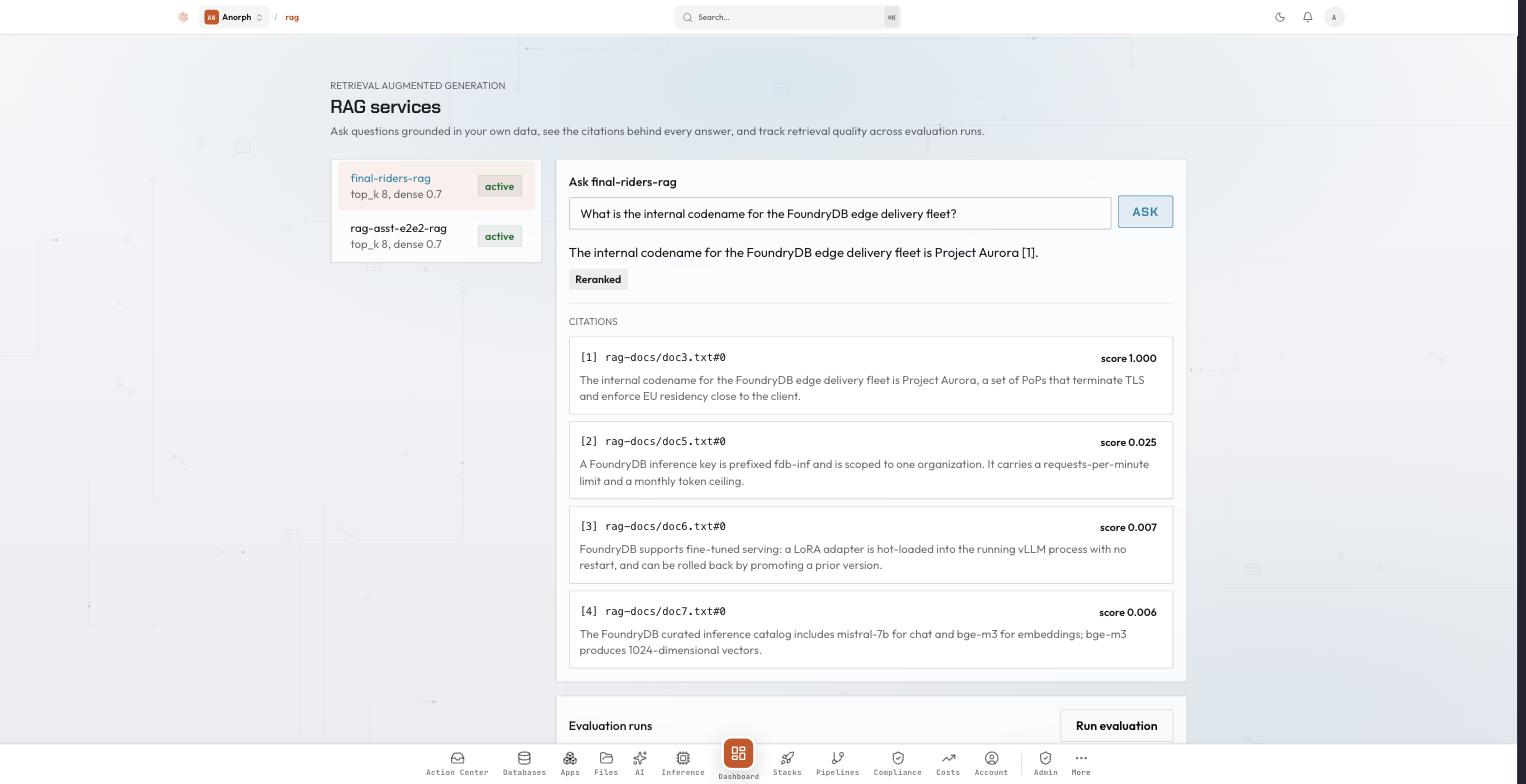
Reading the screen: the service list on the left shows each service's retrieval policy (top_k 8, dense 0.7) and status. The answer carries its bracketed citation, and the Reranked chip confirms stage two ran on this request. Each citation shows its source_row_id and score to three decimals, so the 1.000 against 0.025 gap is visible without reading JSON. Below it, the evaluation-runs table tracks MRR and Recall@k over time.
The console page is read, query, and evaluate. Creating and configuring RAG services is API, SDK, and MCP only today.
Current limits
Worth knowing before you build on this:
- The golden set is write-only over the API. There is no
GET, so keep the source of truth on your side. eval-runsreturns the 50 most recent runs with no pagination.- A bound
embedding_pipeline_idorreranker_service_idcan be changed but not unset throughPATCH. name,pg_service_id,files_service_id,files_prefix, andchunk_strategyare fixed at create time.- The Go SDK covers create, list, get, delete, and query. The evaluation harness is REST only.
Cleanup
curl -s $AUTH -X DELETE $API/rag-services/$RAG_ID          # 204, soft delete, leaves your data alone
curl -s $AUTH -X DELETE $API/inference-services/<embed-id>
curl -s $AUTH -X DELETE $API/inference-services/<reranker-id>
curl -s $AUTH -X DELETE $API/managed-services/$PG_ID
curl -s $AUTH -X DELETE $API/file-services/$FILES_ID
If you launched the stack, delete the stack instead and it tears down all five components together.
What you built
- A question-answering endpoint over your own documents, returning citations you can check.
- A managed ingestion path from a Files bucket into
pgvector, with the pipeline holding a credential scoped to one prefix. - Two-stage retrieval, where the second stage is one patched field and cannot take the service down when it fails.
- A repeatable quality measurement, so tuning retrieval is an experiment rather than an argument.
Every component is FoundryDB-managed and EU-resident: the bucket, the database, the embedding model, the reranker, the model that writes the answer, and the evaluation itself. No external AI provider sees your documents or your questions.
Next steps
- Build an In-Platform RAG Assistant for the same pipeline assembled by hand, if you want to see the mechanism.
- Two-Stage Semantic Search with a Reranker for retrieve-then-rerank as a search feature rather than a question-answering one.
- Embedding pipelines for scheduled and continuous ingestion, chunking, and run history.
- Managed Inference for GPU plans, the curated catalog, keys, and limits.
- Files for buckets, scoped access keys, and presigned uploads.